Minggu, 13 Februari 2011

Kind of Expressions

Agreeing and disagreeing

Improving your English vocabulary is not as difficult as you think. You just need to become familiar with useful English words, phrases and expressions. This page will help you with telling someone that you agree or disagree with their opinion.

  1. Positive Agreement
    • We use So+auxiliary or modal verb+subject to express agreement when the sentence is in the positive form:
    • He is British, so am I.
    • Colloquially we can also use Me too .
  2. Negative Agreement
    • We use Neither/Nor+auxiliary or modal verb+subject to express agreement when the sentence is in the negative form:
    • He hasn’t eaten yet, Neither/Nor have I.
    • Colloquially we can also use Me neither
  3. Disagreement
    • We use But+subject+auxiliary or modal verb to express disagreement.
    • If the sentence is in the positive form, the auxiliary verb is in the negative form:
    • I like reading books, but he doesn’t.
    • If the sentence is in the negative form, the auxiliary verb is in the positive form: He wasn’t playing tennis, but they were.


Agreeing
"I think you're right."
"I agree with you."


Strong agreement
"I couldn't agree with you more."
"You're absolutely right."
"I agree entirely."
"I totally agree."


Agreeing in part
"I agree with you up to a point, but..."
"That's quite true, but..."
"I agree with you in principle, but..."


Disagreeing
"I'm not sure I agree with you."
"(I'm afraid) I don't agree."
"(I'm afraid) I disagree."
"(I'm afraid) I can't agree with you."
"(I'm afraid) I don't share your opinion."

Note that when you disagree with someone, you can often sound
more polite by using a phrase such as "I'm afraid..."


Disagreeing strongly
"I don't agree at all."
"I totally disagree."
"I couldn't agree with you less."


OPINION

An opinion is a subjective statement or thought about an issue or topic, and is the result of emotion or interpretation of facts. An opinion may be supported by an argument, although people may draw opposing opinions from the same set of facts. Opinions rarely change without new arguments being presented. However, it can be reasoned that one opinion is better supported by the facts than another by analysing the supporting arguments.[1]
An opinion may be the result of a person's perspective, understanding, particular feelings, beliefs, and desires. In casual use, the term opinion may refer to unsubstantiated information, in contrast to knowledge and fact-based beliefs.

Noun1.opinionopinion - a personal belief or judgment that is not founded on proof or certainty; "my opinion differs from yours"; "I am not of your persuasion"; "what are your thoughts on Haiti?"
idea - a personal view; "he has an idea that we don't like him"
judgment, judgement, mind - an opinion formed by judging something; "he was reluctant to make his judgment known"; "she changed her mind"
belief - any cognitive content held as true
eyes - opinion or judgment; "in the eyes of the law"; "I was wrong in her eyes"
parti pris, preconceived idea, preconceived notion, preconceived opinion, preconception, prepossession - an opinion formed beforehand without adequate evidence; "he did not even try to confirm his preconceptions"
pole - one of two divergent or mutually exclusive opinions; "they are at opposite poles"; "they are poles apart"
political sympathies, politics - the opinion you hold with respect to political questions

2.opinionopinion - a message expressing a belief about something; the expression of a belief that is held with confidence but not substantiated by positive knowledge or proof; "his opinions appeared frequently on the editorial page"
subject matter, content, message, substance - what a communication that is about something is about
adverse opinion - an opinion concerning financial statements (usually based on an audit by a CPA) that the statements as a whole do not present results fairly or are not in conformity with the generally accepted accounting practices of the United States
speculation, supposition, surmisal, surmise, guess, conjecture, hypothesis - a message expressing an opinion based on incomplete evidence
side, position - an opinion that is held in opposition to another in an argument or dispute; "there are two sides to every question"

3.opinion - a belief or sentiment shared by most people; the voice of the people; "he asked for a poll of public opinion"
belief - any cognitive content held as true

4.opinionopinion - the legal document stating the reasons for a judicial decision; "opinions are usually written by a single judge"
legal document, legal instrument, official document, instrument - (law) a document that states some contractual relationship or grants some right
concurring opinion - an opinion that agrees with the court's disposition of the case but is written to express a particular judge's reasoning
dissenting opinion - an opinion that disagrees with the court's disposition of the case
majority opinion - the opinion joined by a majority of the court (generally known simply as `the opinion')
fatwah - (Islam) a legal opinion or ruling issued by an Islamic scholar; "bin Laden issued three fatwahs calling upon Muslims to take up arms against the United States"
dictum, obiter dictum - an opinion voiced by a judge on a point of law not directly bearing on the case in question and therefore not binding
law, jurisprudence - the collection of rules imposed by authority; "civilization presupposes respect for the law"; "the great problem for jurisprudence to allow freedom while enforcing order"

5.opinionopinion - the reason for a court's judgment (as opposed to the decision itself)
judicial decision, judgment, judgement - (law) the determination by a court of competent jurisdiction on matters submitted to it
fatwa - a ruling on a point of Islamic law that is given by a recognized authority
law, jurisprudence - the collection of rules imposed by authority; "civilization presupposes respect for the law"; "the great problem for jurisprudence to allow freedom while enforcing order"

6.opinion - a vague idea in which some confidence is placed; "his impression of her was favorable"; "what are your feelings about the crisis?"; "it strengthened my belief in his sincerity"; "I had a feeling that she was lying"
idea, thought - the content of cognition; the main thing you are thinking about; "it was not a good idea"; "the thought never entered my mind"
presence - the impression that something is present; "he felt the presence of an evil force"
effect - an impression (especially one that is artificial or contrived); "he just did it for effect"
first blush - at the first glimpse or impression; "at first blush the idea possesses considerable intuitive appeal but on closer examination it fails"
hunch, suspicion, intuition - an impression that something might be the case; "he had an intuition that something had gone wrong"

Jumat, 27 Agustus 2010

Talking about Message

Claire:Hello, finance department
Female:Hello, can I speak to Adrian Hopwood, please?
Claire:I’m afraid he’s in a meeting at the moment. Can I help?
Female: No I need to talk to Mr Hopwood, I think. What time will he be out of the meeting?
Claire:In about an hour. Can you call back later?
Female: Okay, I’ll do that.
Claire:Or can I take a message?
Female:Actually, would you mind? Could you tell him that Jennifer McAndrews called and that I’m in the office all day if he could call me back.
Claire:Can I take your number, please?
Female: Yes, it’s 5556872.
Claire:5556872. Okay, I’ll make sure he gets the message.
Female:Thanks very much for your help, bye!
Claire:Goodbye!

Telephone Messages

Sometimes, there may not be anyone to answer the telephone and you will need to leave a message. Follow this outline to make sure that the person who should receive your message has all the information he/she needs.
1. Introduction - - - - Hello, this is Ken. OR Hello, My name is Ken Beare (more formal).
2. State the time of day and your reason for calling - - - - - It's ten in the morning. I'm phoning (calling, ringing) to find out if ... / to see if ... / to let you know that ... / to tell you that ...
3. Make a request - - - - Could you call (ring, telephone) me back? / Would you mind ... ? /
4. Leave your telephone number - - - - My number is .... / You can reach me at .... / Call me at ...
5. Finish - - - - Thanks a lot, bye. / I'll talk to you later, bye.
Here's an example of message
Telephone: (Ring... Ring... Ring...) Hello, this is Tom. I'm afraid I'm not in at the moment. Please leave a message after the beep..... (beep)
Ken: Hello Tom, this is Ken. It's about noon and I'm calling to see if you would like to go to the Mets game on Friday. Could you call me back? You can reach me at 367-8925 until five this afternoon. I'll talk to you later, bye.
As you can see, leaving a message is pretty simple. You only need to make sure that you have stated all the most important information: Your Name, The Time, The Reason for Calling, Your Telephone Number

Short Message Service (SMS) is the text communication service component of phone, web or mobile communication systems, using standardized communications protocols that allow the exchange of short text messages between fixed line or mobile phone devices. SMS text messaging is the most widely used data application in the world, with 2.4 billion active users, or 74% of all mobile phone subscribers. The term SMS is used as a synonym for all types of short text messaging, as well as the user activity itself, in many parts of the world.

SMS as used on modern handsets was originated from radio telegraphy in radio memo pagers using standardized phone protocols and later defined as part of the Global System for Mobile Communications (GSM) series of standards in 1985 as a means of sending messages of up to 160 characters, to and from GSM mobile handsets. Since then, support for the service has expanded to include other mobile technologies such as ANSI CDMA networks and Digital AMPS, as well as satellite and landline networks. Most SMS messages are mobile-to-mobile text messages, though the standard supports other types of broadcast messaging as well.


Jumat, 14 Mei 2010

How to edit photo on adobe photoshop


Step 1

Create a new document at 1200 x 800 pixels with a resolution of 72dpi. Start off by importing all of vector designs separately into a Photoshop canvas. In this case divide our vectors into 3 separate smart objects and dragged them into the Photoshop canvas


Step 2

Hide all vectors and create a new text box. In this case type out the name of a character like “Creative Volition Inc”. The font we choose “ITC Avant Garde Gothic”. Keep your font in full caps, especially if your using this one! Continue to copy/paste your text across the box.


Step 3

Text settings : 16pt font, 16 pt height spacing, color #404040


Step 4

Continue to copy /paste the text until it fills the entire canvas. Stretch box out using the text tool until it expands beyond the canvas size


Step 5

Once the text box is filled completely with the copy begin to rotate the box clockwise in about a 45 degree angle.


Step 6

Make one of the smart objects visible. Command/Apple click the preview box on the layer panel to create marching ants around your object.


Step 7

Once the marching ants appear, hide your smart object so you an see the selection.


Step 8

Rasterize the type layer and with the marching ants active on your rasterized layer clik Edit > Cut.


Step 9

Then click Edit > Paste and align your new layer so all the words connect. Open the layer Style box and change the “Color Overlay” to white.


Step 10

Continue to do the same procedure with your other smart object layers but make sure to always cut from the rasterized layer.


Step 11

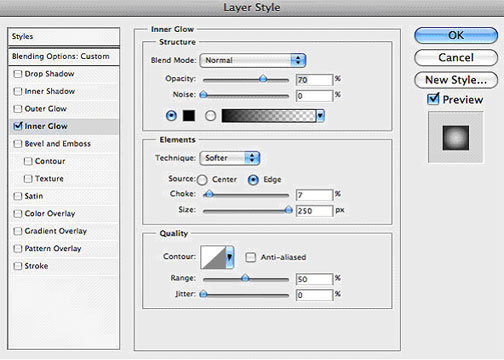
Lastly create a new layer and fill it with any color. Place this layer on top of all other layrs. Drop the fill down to 0%. Open the Layer Styles box and change the inner glow to the following settings and click OK.


Conclusion

That’s it! You should now have a beautiful design in front of you.


Minggu, 25 April 2010

HOW TO MAKE YAHOO


Ketik alamat yahoo.com ketika masuk di webpage.

Type yahoo.com when you come on webpage.


Setelah masuk pada halaman utama yahoo, klik pada bagian yang sudah dilingkari seperti pada gambar di atas untuk mendaftar.

After you come on yahoo homepage, click the surrounded part like the picture above to sign up.


Setelah itu, isilah akun registrasi seperti nama, alamat email, lokasi, dll. Setelah itu, untuk melanjutkan proses penerimaan akun, klik pada bagian yang sudah dilingkari seperti pada gambar di atas.

After that, fill the account registration like name, email address, location, etc. Then, to continue accepting account process, click the surrounded part like the picture above.


Anda telah terdaftar di yahool. Untuk melanjutkan aksi anda, klik pada bagian yang sudah dilingkari seperti pada gambar di atas.

You was sign in yahoo. To continue your action, click the surrounded part like the picture above.


Untuk mengunggah foto, mengirim pesan atau mengisi profil, klik pada bagian yang sudah dilingkari seperti pada gambar di atas….Selamat Mencoba !

To upload a photo, send a message or fill a profile, click the surrounded part like the picture above…. Let’s to try!


Selasa, 13 April 2010

HOW TO MAKE TWITTER


Ketik alamat twitter.com ketika masuk di webpage.

Type twitter.com when you come on webpage.


Setelah masuk di halaman utama twitter, klik pada bagian yang sudah dilingkari seperti pada gambar di atas untuk bergabung di twitter.

After you come on twitter homepage, click the surrounded part like the picture above to join on twitter.


Setelah itu, isilah akun registrasi seperti nama, alamat email, lokasi, dll. Setelah itu, untuk melanjutkan proses penerimaan akun, klik pada bagian yang sudah dilingkari seperti pada gambar di atas.

Then, fill the account registration like name, email address, location, etc. After that, to continue accepting account process, click the surrounded part like the picture above.


Untuk memilih desain pada twitter anda, klik pada bagian yang sudah dilingkari seperti pada gambar di atas.

To choose a design on your twitter, click the surrounded part like the picture above.


Setelah memilih desain, lanjutkan klik pada bagian yang sudah dilingkari seperti pada gambar di atas.

After choose a design, continue at the surrounded part like the picture above.


Untuk mencari teman, klik pada bagian yang sudah dilingkari seperti pada gambar di atas.

To find a friend, click the surrounded part like the picture above.


Setelah itu, isilah alamat email anda dan sandinya. Lalu klik pada bagian yang sudah dilingkari seperti pada gambar di atas untuk melanjutkan.

After that, fill your email address and the password. The, click the surrounded part like the picture above to continue.


Klik pada bagian yang sudah dilingkari seperti pada gambar di atas untuk memilih seluruh kontak teman anda di email untuk menjadi teman anda di twitter.

Click the surrounded part like the picture above to choose all of your friend contact on email to be a your friend on twitter.


Klik pada bagian yang sudah dilingkari seperti pada gambar di atas untuk melanjutkan ke tahap selanjutnya.

Click the surrounded part like the picture above to continue the next step.


Untuk mencari teman anda, ketik nama teman anda pada bagian yang sudah dilingkari seperti pada gambar di atas.

To find your friend, type your friend name at the surrounded part like the picture above.